
I installed one of the nest Nest Thermostats (http://www.nest.com) not so long ago, but there are several things I wanted to automate. In particular, I wanted to be able to schedule the fan to turn on and off periodically to circulate the air in my house. The nest doesn’t have a way to do this, but it does have a WEB interface, so I figured… how hard could it be to interact with the nest?
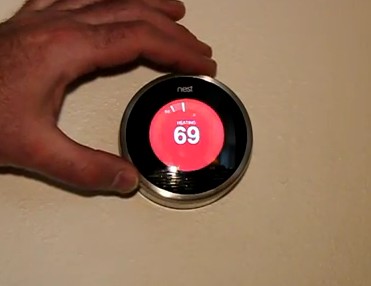
The Nest and My Hand
Well, turns out it was a little harder than I thought. My initial attempts at peeking at what the Web browser app was doing yielded some insights into the protocol, but not enough. Trying to snoop in the protocol by diverting it through a proxy didn’t work for me (it kept giving network errors when doing this from my iPad). I started looking around the web and came across a few other projects. One was a .net API written by Aaron at WiredPrarie (http://www.wiredprairie.us/blog/index.php/archives/1449). The other was a Siri plugin written in Ruby by Chris Burris (https://github.com/chilitechno/SiriProxy-NestLearningThermostat). Unfortunately neither one did what I needed. The .net API was read only, and the Ruby API lacked anything to do with fan control.
However, Chris’ code was enough to get me poking around the data structures in and short order I had managed to figure out enough of the API to turn the fan on and off (well “on” and “auto” to be more precise). I also added the ability to query status, and the ability to set the target temperature.
The code is hosted on githut at http://github.com/smbaker/pynest. For those unfamiliar with git, you should be able to download the whole package in a ZIP http//github.com/smbaker/pynest/zipball/master.
Let’s look at a sample session:
$ nest.py help
syntax: nest [options] command [command_args]
options:
   --user       ... username on nest.com
   --password
  ... password on nest.com
   --celsius              ... use celsius (the default is farenheit)

commands: temp, fan, show, curtemp, curhumid
    temp     ... set target temperature
    fan [auto|on]         ... set fan state
    show                  ... show everything
    curtemp               ... print current temperature
    curhumid              ... print current humidity

examples:
    nest.py --user joe@user.com --password swordfish temp 73
    nest.py --user joe@user.com --password swordfish fan auto

$ nest.py --user joe@user.com --password swordfish temp 72

$ nest.py --user joe@user.com --password swordfish show
$timestamp......................: 1336793938000
$version........................: -27052532
auto_away.......................: 0
auto_away_enable................: True
auto_away_learning..............: ready
auto_away_reset.................: False
away_temperature_high...........: 24.44444
away_temperature_high_enabled...: False
away_temperature_low............: 10.0
away_temperature_low_enabled....: True
backplate_bsl_info..............: BSL
backplate_bsl_version...........: 1.1
backplate_model.................: Backplate-1.9
backplate_mono_info.............: TFE (BP_DVT) 3.7.3 (ehs@ubuntu) 2012-03-07 10:43:21
backplate_mono_version..........: 3.7.3
backplate_serial_number.........: [redacted]
battery_level...................: 3.864
can_cool........................: True
can_heat........................: True
capability_level................: 2.0
click_sound.....................: on
compressor_lockout_enabled......: False
compressor_lockout_timeout......: 0
creation_time...................: 1332733610873
current_humidity................: 38
current_schedule_mode...........: COOL
current_temperature.............: 20.81
current_version.................: 2.0
equipment_type..................: electric
fan_cooling_readiness...........: ready
fan_cooling_state...............: False
fan_mode........................: auto
forced_air......................: True
has_aux_heat....................: True
has_fan.........................: True
has_heat_pump...................: True
has_x2_heat.....................: False
heat_pump_aux_threshold.........: 4.444443
heat_pump_aux_threshold_enabled.: True
heat_pump_comp_threshold........: -31.5
heat_pump_comp_threshold_enabled: False
hvac_ac_state...................: False
hvac_aux_heater_state...........: False
hvac_fan_state..................: False
hvac_heat_x2_state..............: False
hvac_heater_state...............: False
hvac_pins.......................: Y1,C,Rh,G,OB,Aux
hvac_wires......................: Cool,Fan,Heat Pump OB Shorted,Heat Pump Auxiliary Heat,Common Wire,Rh
leaf............................: False
leaf_away_high..................: 25.109894
leaf_away_low...................: 16.669998
leaf_learning...................: ready
leaf_schedule_delta.............: 1.109985
leaf_threshold_cool.............: 25.109985
leaf_threshold_heat.............: 1000.0
learning_days_completed_cool....: 0
learning_days_completed_heat....: 18
learning_days_completed_range...: 0
learning_mode...................: False
learning_state..................: initial
learning_time...................: 1745
local_ip........................: [like my local IP would have been useful to you?]
lower_safety_temp...............: 7.0
lower_safety_temp_enabled.......: True
mac_address.....................: [redacted]
model_version...................: Diamond-1.12
name............................: Nest
nlclient_state..................:
ob_orientation..................: O
postal_code.....................: [also redacted]
range_enable....................: True
rssi............................: 75.0
schedule_learning_reset.........: False
serial_number...................: [yes, I removed even this from your prying eyes]
switch_preconditioning_control..: False
switch_system_off...............: False
target_change_pending...........: False
target_temperature..............: 21.02611
target_temperature_high.........: 26.66663
target_temperature_low..........: 16.66663
target_temperature_type.........: cool
target_time_confidence..........: 0.0
temperature_lock................: False
temperature_scale...............: F
time_to_target..................: 0
time_to_target_training.........: training
type............................: TBD
upper_safety_temp...............: 35.0
upper_safety_temp_enabled.......: False
user_brightness.................: medium
Now, back to the task at hand. I want my nest to switch it’s fan state to “on” at 11am, and switch it back to “auto” at 7pm. At least that’s a good enough start, perhaps later we can do something fancier, like running it hourly to recirculate the air. This should be as simple as setting up a cron job:
$ crontab -e
0 11 * * * /usr/bin/nest.py --user joe@user.com --password swordfish fan on >/dev/null 2>&1
0 19 * * * /usr/bin/nest.py --user joe@user.com --password swordfish fan auto >/dev/null 2>&1
The above cron entries will turn the fan on at 11:00 every day and back to auto at 19:00 every day.

Awesome. I’ve been waiting for a way to read some variables into Indigo from Nest. 1 question, can it handle multiple Nests on the same account?
I just pushed an update to github that should have support for multiple nests. I’ve provided two ways to do it. One is to use the “–index” argument. For example, “–index 1” to use the second nest.
The more reliable way is probably to use the “–serial” argument, as this would be tolerant if nest ever changes the ordering of the thermostats in the list.
Both options are untested, as I only have one nest.
In preparation of getting some more Nests, I added an additional location using the nest website (Settings->Location->Add Location). This is a new location, but no nest thermostat has yet been associated with it. nest.py no longer works and returns an error when attempting to access the added location:
$) ./nest.py –user XXXXXXXXX –password YYYYYY –index 1 show
File “./nest.py”, line 232, in
main()
File “./nest.py”, line 207, in main
n.get_status()
File “./nest.py”, line 79, in get_status
self.device_id = res[“structure”][self.structure_id][“devices”][self.index]
IndexError: list index out of range
Thanks for posting this!
Would it take much to read a few other variables such as whether the AC is currently running and if the nest is in away mode? I’ve also used this to incorporate the current temperature & humidity into Indigo.
I was getting ready to do this exact same thing when I found your site. However, when I run your python script, I am getting http 400 bad request. Is this code still working or did Nest change their website?
I just tried it, and it’s still working. I don’t do a very good job of input validation though. For example “fan off” will generate a 400 error (“fan auto” and “fan on” are the valid values). What command did you give the script?
I figured it out. I used a complex generated password. The special characters were messing it up. I just needed to escape those characters.
Another question, is there supposed to be any output returned when you set the temp. I just get a blank line but it does actually set the temp.
So I am blowing up your blog. I just changed your code to output the http status when updating the temp.
Do you know if the
auto_away…………………..: 0
turn into 1 when you’re out?
I am planning to query this value then trigger something when no one is home.
Thank you
Thanks a million for the work!
I used what you made, modified it a bit, put in an applescript wrapper and now I have both my thermostat status’s on my desktop!
gotta love Geektool and the Mac
thanks!
Scott
Thanks for this lovely little project!
I’m enjoying my nest, but an autocycling of the fan is something I do find lacking.
Keep up the good work.
I have a question for you:
Do you know if there is a way to scrape the energy reporting values from the nest?
I’m trying to keep the times of when the AC/Heat is turned on and off.
Thanks again
Nice work, exactly what I was looking for, thank you for posting this. I also was wondering if you had any ideas for extracting the energy usage data, that would be good for external archiving and graphing purposes.
hello there! Great piece of code! Is there anyway you could integrate the switch_system_off? I tried to follow your code and send it like you send the change temperature function but fails on me… http bad request :/ Any ideas? Thanks
It’s funny, I was just about to ask the same question as el do. Love the script idea – we’ve been running the fan always to circulate the air since auto wasn’t cutting it. I was actually hoping maybe they’d add the fan to part of the scheduling, too.
But yeah, I’d really like to be able to assemble historical energy usage stats. The device/control panel only seems to go about a week and a half back, but they *do* have those monthly energy reports…but they aren’t available online!
Thanks for the script.
Here is KSH script to read in the setpoint and current temp
and output for use with MRTG. Should work with bash as well.
—————–cut here start————–
#!/bin/ksh
#
# get_nest_temp.sh
# Output is Degrees F
U=”NestAccount_Username”
P=”NestAccountP_Password”
#set -x
ANS=`/usr/bin/nest.py –user=$U –password=$P show|egrep -w ‘current_temperature|target_temperature’|cut -d: -f2`
# Current Temp
CT=`echo $ANS|cut -d’ ‘ -f1|sed ‘s/ *//g’`
CTF=`echo “$CT * 9 / 5 + 32″| bc`
# Target Temp
TT=`echo $ANS|cut -d’ ‘ -f2|sed ‘s/ *//g’`
TTF=`echo “$TT * 9 / 5 + 32″| bc`
#echo $ANS
echo “$CTF”
echo “$TTF”
echo “0”
echo “0”
exit
———————-cut here end—————–
Here is an MRTG config file to plot the data.
———————-cut here start—————
######################################################
# MRTG CONFIG FILE
# Nest Set Point vs Actual temp
######################################################
WorkDir: /var/www/mrtg/nest
######################################################
# MRTG CONFIG FILE
# Temp
######################################################
Title[^]: nest – Nest Temperature
IconDir: /mrtg
Target[NEST01_TEMP]:`/usr/local/bin/get_nest_temp.sh`
MaxBytes[NEST01_TEMP]: 100
Title[NEST01_TEMP]: Nest Temperature
PageTop[NEST01_TEMP]: Nest Temperature
Options[NEST01_TEMP]: gauge, nopercent, absolute
Unscaled[NEST01_TEMP]: dwmy
#Supress[NEST01_TEMP]: dwmy
XSize[NEST01_TEMP]: 380
YSize[NEST01_TEMP]: 100
YLegend[NEST01_TEMP]: deg F
ShortLegend[NEST01_TEMP]: deg F
Legend1[NEST01_TEMP]: Nest Temperature Current:
Legend2[NEST01_TEMP]: Nest Temperature Setpoint:
LegendI[NEST01_TEMP]: Current Temp deg F
LegendO[NEST01_TEMP]: Setpoint Temp deg F
#
———————-cut here end——————-
Dave
Wow, thanks for publishing this! After just a few minutes, I now have a cron job setup to enable/disable the fan on schedule.
Excellent work!! Pulled from Github, fired up, works like a champ.
Would you mind if I did a pull request to add the ability to not specify the password on the command line, and if not specified, you’re prompted for the password?
I’ve got to say… Creative Commons Non-Commercial for an open source project like this? You make it really hard to integrate with other proper open source projects that have more liberal licenses such as MIT/BSD/GPL/etc.
Does anyone know who made this feed on Cosm? I am willing to bet he used this API. I wish there was more info about how this was done. I would love to create a variation, but have very limited Python experience.
https://cosm.com/feeds/90103
Oh, and THANK YOU, Scott for making this available!
Thanks for putting this together! I now have both of my Nest’s being monitored in MRTG (Temp and Humidity for each one, Heating/Cooling State and Battery Levels). I did use a Perl program instead of the KSH program listed above to scrape out the data I wanted. MRTG simply does a ‘cat’ on the file to get the values.
Nice job, Scott – works great on the Mac! Thanks!!
Thank you for this I now have my nest controlling one of my Philips hue lights and have a MySQL DB so I can make my own graphs on the temps and run times
Thanks for this… I’ve been wondering about the best times to use my wholehouse fan. With this, I could check the temp and humidity and compare it to an outside dewpoint (collected from a weather script), and know when the right time is to use the wholehouse fan over the A/C. That should save some big bucks, too…
Thank you! I’ve been looking for this for a long time.
I sure wish they would just implement some smart fan controls on the nest itself… seems like it’s a very popular request.
Hi I bought my nest a few days ago and am not too thrilled on the functionality/availability of the data via the nest web sight. I came across this page and thought that id give your python program a try. But unfortunately for me I have no programming experience with python and cant figure out what to do once downloaded. Can you point me in the right direction on where to get started??
Anyone have problems lately? Is NEST updating their interface for the (new?) public API?
My last consistent script run was 3/12 at 23:00 EDT, then (1) success on 3/13 at 13:00, then nothing. (My script runs every hour)
My nest.py also stoped working.
Here are the errors.
Traceback (most recent call last):
File “/usr/local/bin/nest.py”, line 232, in
main()
File “/usr/local/bin/nest.py”, line 206, in main
n.login()
File “/usr/local/bin/nest.py”, line 57, in login
res = urllib2.urlopen(req).read()
File “/System/Library/Frameworks/Python.framework/Versions/2.7/lib/python2.7/urllib2.py”, line 126, in urlopen
File “/System/Library/Frameworks/Python.framework/Versions/2.7/lib/python2.7/urllib2.py”, line 400, in open
File “/System/Library/Frameworks/Python.framework/Versions/2.7/lib/python2.7/urllib2.py”, line 513, in http_response
File “/System/Library/Frameworks/Python.framework/Versions/2.7/lib/python2.7/urllib2.py”, line 438, in error
File “/System/Library/Frameworks/Python.framework/Versions/2.7/lib/python2.7/urllib2.py”, line 372, in _call_chain
File “/System/Library/Frameworks/Python.framework/Versions/2.7/lib/python2.7/urllib2.py”, line 521, in http_error_default
urllib2.HTTPError: HTTP Error 400: Bad Request
@Matt – Any luck getting it to work again? I hadn’t tried the script until just yesterday and encountering errors with the urllib2 call. At work now but can provide the error messages later. I unfortunately don’t have a succesful run yet so not sure if it’s due to changes on the Nest side or issues on my end (I have 2 Nests and trying to use the -index option so I think I’ve run properly)
Thanks for this, very inspiring web page. I have a very odd problem, which maybe is not so uncommon in the uk. Because of the way my boiler-heating system-hot water tank are configured, I can only heat my flat when the hot water is on. As you know, this is not easy to achieve unless you give up on all of the smart functionality of the thermostat with regard to heating. With what you know, could I write a script that linked the learning function of the nest such that, if the hot water happens to be off, it is turned on before the flat starts getting heated? Of course, I could bypass this problem by leaving the hot water on all the time, but this would not be very energy efficient. Thanks in any case!
Still works a billion years later..
Using it to turn off the TV when nobody is home.. abject hackery btw..
shell script 1 – tv.turnoff
echo “standby 0” | cec-client -s
shell script 2 – checkaway.sh
if /usr/local/bin/nest.py -c –user nestusername –password nestpassword show | grep “auto_away…………………..: 1”; then
/usr/local/bin/tv.turnoff
exit $?
fi
cronjob
*/10 * * * * /usr/local/bin/checkaway.sh > /dev/null 2>&1
Quick update to above..
Added
shared = self.status[“shared”][self.serial]
device = self.status[“device”][self.serial]
structure = self.status[“structure”][self.structure_id]
allvars = structure
allvars.update(device)
allvars.update(shared)
And the grep string is grep “away……………………….: True”
My kids will thank you for not getting yelled at for leaving the TV on.. 🙂
Hello, It seems that the script stop functionny as from Aug 2019…
Maybe Nest change his authentication method?
Do you expect to adapt?
Regards
I haven’t used it in some time, but you might want to check the github repository, several people have forked it, and one of them might still be using it.