
In this blog post, I design and implement a brand new operating system for old computers.
Why implement a new operating system?
Let’s face it, there’s already RomWBW and Fuzix for the RC2014, and if you’re not that ambitious, there’s plenty of options for running BASIC directly from ROM. So why implement a new operating system? Well, I’ve always wanted to design my own operating system. Operating systems are often a product of the computers they were designed for. We have HDOS for the Heathkit H8 which is a really cool OS offering support for runtime loadable drivers. We have ISIS for 8080-based Intel development systems with its easily reassignable devices. Of course we have CP/M with its wealth of user applications. I’ve always wanted to design my own, and I could pull features from here and there.
My goals
- An operating system that is inherently rommable, and prefers to be run from ROM.
- Robust support for a plethora of serial (ACIA, SIO/2, SCC, Z80-SCC) devices and storage devices (FDC, CF, Bubble, Romdisk, Ramdisk).
- Runtime-loadable extensions for runtime-devices or other features.
- Runtime assignable logical devices to allow easy remapping and duplication of console or serial IO.
- Speech synthesis and Text-to-Speech as first-class features of the operating system.
- Support for memory-mapping (512K ROM, 512K RAM) or fixed memory (32K ROM, 32K RAM). Easily modifiable to other memory schemes.
- It must support Zork, Basic, and Forth.
The code is available
You can download NostOS at https://github.com/sbelectronics/nostos and there are even ROM images there that can be burned directly to an RC2014.
Let’s do a walkthrough
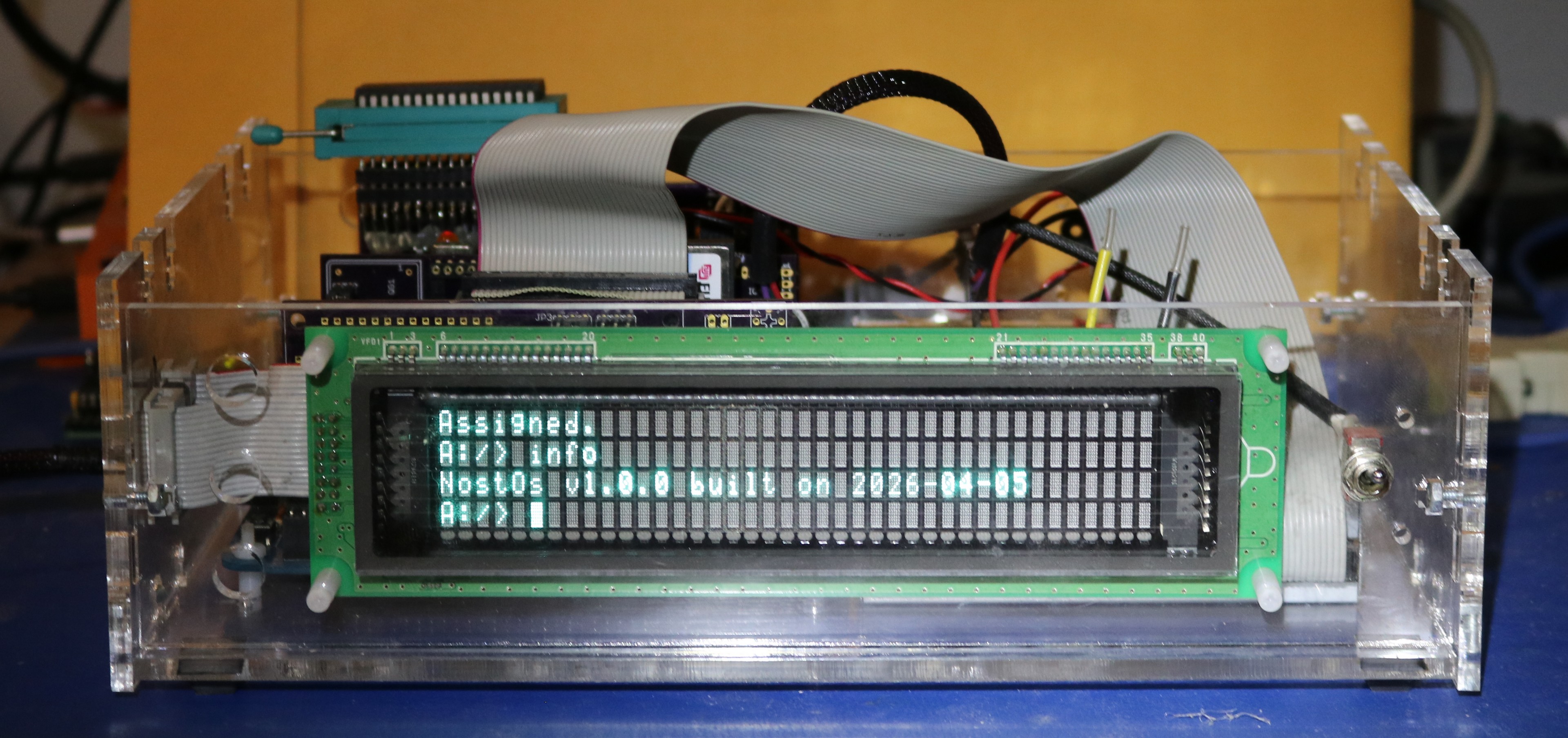
I’m going to use the nostos-prod-acia-512k.rom image. This one supports a compact flash device, 512K ROM / 512K RAM, and uses an ACIA for serial communication. Let’s power it on:
A:/> A:FORMAT.APP RAMD: 744
Formatted 744-block filesystem.
A:/> MOUNT RAMD B
Mounted.
A:/> TYPE WELCOME.TXT
Welcome to NostOS: The Nostalgia operation system!
You may use "HELP" to get a list of available executive commands.
A:/>
We can see some stuff happened immediately on boot. NostOS includes playable scripts, and if the special script AUTO.PLY is present it is executed automatically. The production image includes an AUTO.PLY that formats the RAMDISK and prints a WELCOME.TXT message. By default, A: is the ROMDISK. Since we have a 512K ROM / 512K RAM RC2014, there is plenty of room for ROMDISK and RAMDISK. Let’s run HELP:
A:/> HELP
NostOS commands:
HP / HELP   - Display help text
IN / INFO   - Display system information
HT / HALT   - Execute HALT instruction
LL / LISTL  - List logical devices
LP / LISTP  - List physical devices
AS / ASSIGN - Assign logical device to physical device
CD / CHDIR  - Change directory
LD / DIR    - List directory
MD / MKDIR  - Make directory
RD / RMDIR  - Remove directory
CF / COPY   - Copy file
RF / DELETE - Delete file
NF / RENAME - Rename file
LF / TYPE   - Display file contents
HF / HEXDMP - Display file as hex dump
MT / MOUNT  - Mount filesystem device on block device
ST / STAT   - Display file status and block map
#  / REMARK - Remark (comment line, ignored)
SM / SUM    - SYSV checksum
FR / FREE   - Display free block count
PL / PLAY   - Execute commands from a script file
NostOS includes a command-line interpreter called the executive, and the executive has a wealth of built-in commands. The executive, like the NostOS kernel, resides in ROM. Let’s get a directory:
A:/> DIR
Directory Listing:
   849 FORMAT.APP
  1957 FDINIT.APP
 12011 BASIC.APP
  9181 FORTH.APP
  4588 ED.APP
  1318 APPEND.APP
  1108 MORE.APP
  1579 WC.APP
  1830 TAIL.APP
  1158 HEAD.APP
 <DIR> GAMES
  1537 DEBUG.APP
  2567 XRECV.APP
  2625 XSEND.APP
    56 AUTO.PLY
   231 HELLOEXT.EXT
  1744 EXTTORTURE.EXT
   252 SPEECH.EXT
  7617 TTS.EXT
   868 VFD.EXT
   728 DUP.EXT
 16686 ZEALASM.APP
   234 SAMPLE.ASM
   119 WELCOME.TXT
A:/>
The directory has several things. There are NostOS applications, which each end in .APP. There are extensions which end in .EXT. NostOS supports subdirectories, and you can see a subdirectory for games here. There’s also a sample assembly language file, the welcome.txt file, and the auto.ply file that ran on startup. Let’s take a look at our devices.
A:/> ll
128 NUL: -> 1 NUL:
129 CONI: -> 2 ACIA:
130 CONO: -> 2 ACIA:
131 SERI: -> 255 UN:
132 SERO: -> 255 UN:
133 PRN: -> 255 UN:
A:/>
LL, or LISTL, will list logical devices. Each logical device can be mapped to a physical device. The two most important to us are CONI and CONO which are the console input and output. You can also set SERI and SERO which are serial input and output and PRN which is our printer. There’s a NUL device which returns an endless stream of 0 characters. You can easily remap these at will with the NostOS assign command. For example, we could reassign CONI or CONO to a different serial device. Let’s look at the physical devices:
A:/> lp
19 B: on RAMD:
17 C: on CF:
16 A: on ROMD:
6 RAMD:
5 ROMD:
255 UN:
14 RND:
1 NUL:
2 ACIA:
3 CF:
A:/>
Here we can see lots of physical devices. Some of them (A:, B: and C:) are mounted filesystems. We also have the UN: device which is unimplemented, and serves to return a constant stream of errors (it’s used to assign things like SERI/SERO or PRN to it when we don’t actually have a physical device to service that purpose). The RND device is a random character generator. ASSIGN CONI: RND: can make for a fun experience. New devices can be added at runtime by loading extensions. Let’s load a couple:
A:/> speech.ext
SP0 device registered.
A:/> tts.ext
TTS device registered.

A:/> lp
20 TTS: on SP0:
18 SP0:
19 B: on RAMD:
17 C: on CF:
16 A: on ROMD:
6 RAMD:
5 ROMD:
255 UN:
14 RND:
1 NUL:
2 ACIA:
3 CF:
A:/>
I just loaded the SP0256A-AL2 speech synthesizer and the TTS device. The SP0: device will output 8-bit phonemes to the speech chip. The TTS: device accepts english text and converts them to phonemes. As you can see, the TTS: device is attached to the SP0: device. Let’s try typing some text:
A:/> copy coni: tts:

(I typed "this is a test" on the keyboard, followed by CTRL-Z)
DH1 IH SS PA4 IH ZZ PA4 AX PA4 TT1 EH SS TT1 PA4
A:/>
I was running this in an emulator, and it emulates the SP0256A-AL2 by printing the phonemes to the console, so you can see the phonemes that were automatically translated from my text. If you watch my channel, you know that speech synthesizers are kinda my thing… It was a mandatory requirement that NostOS include speech synthesis capability.
You can duplicate and reassign devices:
A:/> vfd.ext
VFD device registered.
A:/> dup.ext both vfd: acia:
DUP device registered.
A:/> assign cono: both:
Assigned.
A:/> info
NostOs v1.0.0 built on 2026-04-05
A:/>
Above you can see I loaded an extension driver for a vacuum fluorescent display (VFD) then I loaded the duplicator device, which created a new device BOTH: that outputs to both VFD: and ACIA:. Finally, I reassigned console output to BOTH: so I can see my characters in both the serial terminal and on the VFD. This is the exact setup you can see at the picture of my RC2014 with the VFD at the top of this blog post.
Of course, we have BASIC (ported from RC2104 BASIC / Nascom BASIC) and we have Forth (ported from Fig-Forth):
A:/> basic

Nostos BASIC Ver 4.7c
Copyright (C) 1978 by Microsoft
37729 Bytes free
Ok
print "scott was here"
scott was here
Ok
system
A:/> forth

8080 fig-FORTH 1.1
." Scott was here" Scott was hereOK
BYE A:/>
Finally, I’ll leave you with some Zork:
A:/> cd games
A:/games> zork
ZORK I: The Great Underground Empire
Copyright (c) 1981, 1982, 1983 Infocom, Inc. All rights reserved.
ZORK is a registered trademark of Infocom, Inc.
Revision 88 / Serial number 840726

West of House
You are standing in an open field west of a white house, with a boarded front
door.
There is a small mailbox here.

>open mailbox
Opening the small mailbox reveals a leaflet.

>take leaflet
Taken.

>read leaflet
"WELCOME TO ZORK!

ZORK is a game of adventure, danger, and low cunning. In it you will explore
some of the most amazing territory ever seen by mortals. No computer should be
without one!"


>
As you can probably imagine, it would be simple to use the device duplicate and device reassingment feature to send output simultaneously to both serial console and text-to-speech, and end up with a talking Zork game.
This just scratches the surface. In the coming weekends, I’ll try to write a few more articles on the design and implementation of NostOS.
